

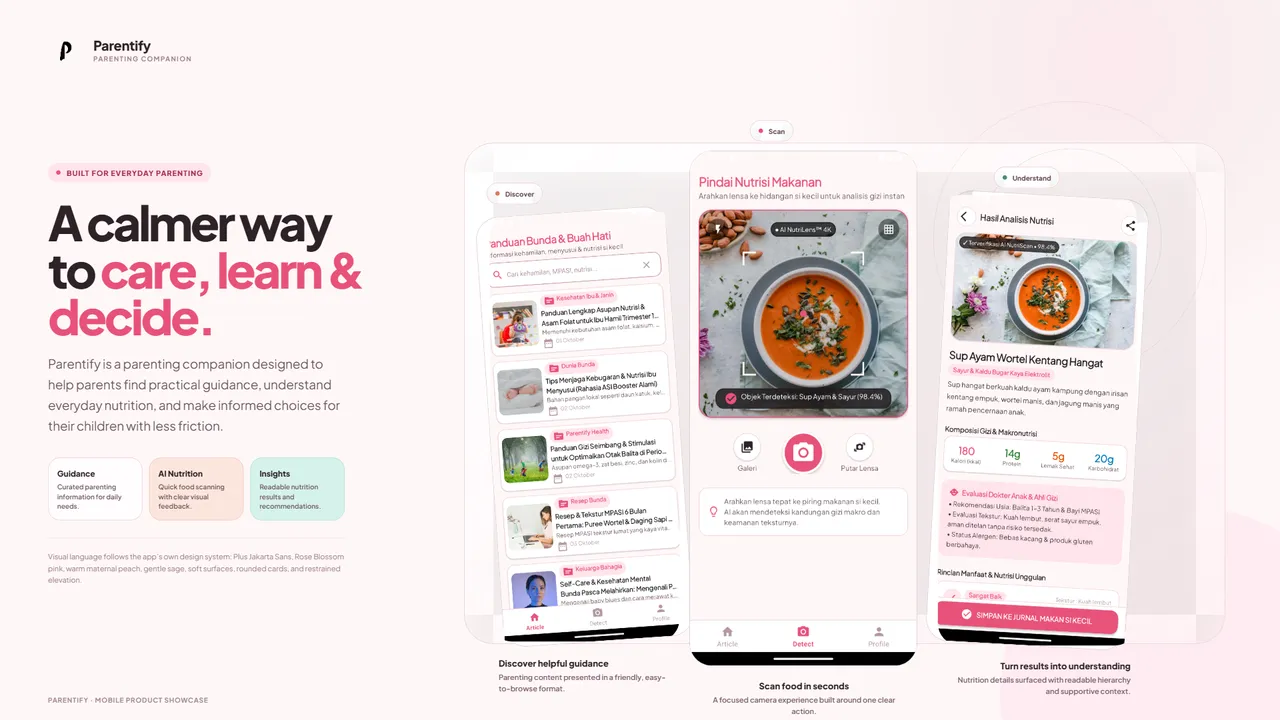
One product, three learning tracks
Parenting information is easy to find, but it is often split across unrelated sources.
A parent may look for childcare guidance in one place and then use another tool to identify or understand a food ingredient. Parentify was our Bangkit Academy capstone attempt to bring those flows into one mobile product.
The app combined curated parenting content with camera-based food recognition. The engineering challenge was less about either feature in isolation and more about making the Android, backend, data, and machine-learning parts agree on the same product flow.
Two user journeys
Parentify had two main journeys.
The parenting guidance flow let users authenticate, browse parenting articles, and open detailed content.
The food recognition flow let users capture an ingredient image, classify it through the machine-learning path, and then retrieve the related food information from the application data.
flowchart LR
    U[Parent] --> APP[Parentify Android app]
    APP --> GUIDE[Parenting guidance]
    APP --> CAMERA[Capture food image]

    GUIDE --> API[Application API]
    CAMERA --> MODEL[Food classifier]

    API --> DATA[Parenting and food data]
    MODEL --> RESULT[Detected ingredient]
    RESULT --> DATA

    DATA --> APP
The user should not have to care that those features came from different Bangkit learning paths. The integration work existed to make them feel like one application.
How the team split the system
The project was split across the three Bangkit tracks:
- Mobile Development owned the Android client and user-facing flows.
- Cloud Computing owned the backend API, authentication path, application data, and integration contract.
- Machine Learning built the image-classification workflow for food ingredients.
The Android app coordinated the experience. Network-backed features called the backend, while the camera flow connected captured images to the classifier and then resolved the detected category into product data.
Mobile experience
The Android application was written in Kotlin and used Android architecture components to keep UI state, navigation, networking, local persistence, and camera behavior separated.
ViewModel and LiveData handled UI state, Navigation Component handled screen transitions, and Hilt provided dependency injection. Retrofit and OkHttp connected the app to remote services, while Room supported local persistence. CameraX powered the food capture flow, and Firebase Authentication was included for identity-related functionality.
That structure supported authentication, parenting content, favorites, camera capture, food detection results, and supporting settings/detail screens without putting the whole product flow into screen code.
Food recognition
The Machine Learning track trained a TensorFlow/Keras convolutional neural network to classify 36 food-ingredient categories.
Training used 150×150 RGB images with a softmax output over the supported classes. The recorded experiment ran for 20 epochs and reached approximately 93.7% validation accuracy at its best observed epoch.
I treat that number as a training result, not a production guarantee. Notebook validation and real camera input are different conditions.
The exported artifacts included both Keras .h5 and TensorFlow Lite formats for mobile-oriented inference.
camera image
→ resize / prepare input
→ CNN inference
→ one of 36 ingredient classes
→ resolve related food information
→ present result to the user
Backend and data contract
My primary responsibility was the Cloud Computing side, especially the backend and integration contract used by the Android app.
The Node.js service used Express for APIs around authentication, parenting articles, and food information. MySQL stored the structured application data.
Authentication used JSON Web Tokens, password hashing with bcrypt, and request validation with Joi. The backend kept database relationships behind an application-facing contract so the Android client could work with stable domain responses instead of database structure.
That contract mattered because each team could progress independently. Integration only worked when naming, payloads, and data relationships matched across all three tracks.
Cloud delivery
The backend was prepared for Google Cloud on a Linux environment with Node.js and MySQL.
Deployment documentation covered application dependencies, database access, service credentials, and an update/deployment script. The repository also included Postman documentation for testing the API contract during integration.
For this capstone, the cloud work was where authentication, persistent data, API behavior, and cross-team integration met.
What I owned
My direct implementation work was primarily in Cloud Computing: backend behavior, application data, authentication, and the API surface consumed by the mobile team.
I also worked at the integration boundary between the cloud, mobile, and machine-learning deliverables. I describe all three parts here because they are necessary to understand the product, not because I implemented every layer myself.
The main lesson was simple. A mobile screen, API endpoint, database table, and model can each work correctly on their own. The product can still fail if their assumptions do not match.
Parentify made contracts and ownership boundaries just as important as the code inside each repository.
Source
Parentify is split across the original Bangkit repositories:
- Parentify: Cloud Computing: backend API, application data, cloud setup, and integration work.
- Parentify: Mobile Development: Kotlin Android application, parenting content, authentication, favorites, and camera/detection flows.
- Parentify: Machine Learning: dataset workflow, CNN training notebook, and exported model artifacts.
The repositories are also collected under the Parentify GitHub organization.